AI for Plaintiff Law Firms
How to Evaluate an AI Voice Agent for Your Law Firm (Before You Commit)

- To evaluate an AI voice agent for your law firm, start with what happens after the call ends: a strong system writes the outcome into your case file without anyone touching it.
- A router answers the call and hands the work back to your team, while a resolver finishes the call and documents it, and demos rarely make that difference visible.
- At a personal injury firm, intake is only about 10 of the roughly 150 calls a case generates, so provider, adjuster, lien, and client calls deserve most of your testing time.
- Pricing only compares fairly when every vendor models the same monthly call volume, and TCPA consent rules, confidentiality terms, and model-training policies belong in writing before go-live.
- A two-week pilot on live calls, scored on unescalated resolutions and manual documentation steps, tells you more than any prepared demo.
Knowing how to evaluate an AI voice agent for your law firm comes down to one test: does the system finish the work a call creates, or does it hand that work back to your team? Most demos look convincing. The voice sounds natural, the answers sound accurate, and the rep says it integrates with your case management system.
Then the system goes live. Calls get answered, but case managers still read summaries, update files, and return calls, and the vendor says to give it more time.
The questions below separate systems that resolve calls from systems that reformat them. Each one comes with what a pass looks like, so you can score vendors side by side before you sign. If intake is the only call type you are buying for, our buyer's checklist for an AI voice assistant for legal intake goes deeper on that workflow.
Quick evaluation checklist [New]
☐ Call outcomes land in the correct matter and fields, shown live ☐ Routine calls close with no follow-up from your staff ☐ The vendor names PI firms running provider and adjuster calls today ☐ Outbound calls start from case conditions, not staff clicks ☐ You hold a written price for your real monthly call count ☐ Consent, confidentiality, and model-training terms are signed ☐ Distressed callers reach a person with the call context attached ☐ Reports flag stalled clients, providers, and case stages ☐ Two weeks of live calls are scored before you sign
What Should an AI Voice Agent Scorecard Cover?
Use this scorecard whenever you evaluate an AI voice agent, and ask each vendor the same questions in the same order. A vendor that cannot show a pass in a live environment has not passed.
| Criterion | What to ask | What a pass looks like | Red flag |
|---|---|---|---|
| CMS write-back | Where does a finished call land in my case file? | Structured notes in the right matter and fields, live | A Zapier or webhook note in a catch-all field |
| Resolution | After this call, does anyone on staff still have to act? | No action needed on routine call types | "It sends your team a summary" |
| PI workflow depth | Which PI firms run live provider and adjuster calls on it? | Named call types with measured results | Only intake examples |
| Outbound calls | What triggers an outbound call? | Case conditions trigger calls without staff starting each one | Outbound only as a paid add-on |
| Pricing | What is my bill at my real call volume? | A written estimate on your numbers | Only the vendor's sample scenario |
| Compliance | How do you handle consent, confidentiality, and model training? | Written terms before any call goes live | "We're compliant" with no document |
| Escalation | What happens when a caller is in distress? | Warm handoff with full context | A voicemail or a cold transfer |
| Reporting | What can I see after a month? | Stalled items by client, provider, and case stage | A call log and nothing else |
| Pilot | Can we run two weeks on live calls? | Yes, on your real call flow | Demo only |
What Happens After the Call Ends?
What the system does after the call ends is the most important question in your evaluation. Voice quality, answer speed, and script flexibility matter, but the value of the call depends on what happens to it next.
An AI voice agent that answers a call and emails your team a summary has replaced a voicemail with a formatted voicemail. Your case manager still reads it, acts on it, and documents the outcome by hand.
Ask whether the system writes call outcomes directly into your case file, and ask to see it in a live environment rather than a screenshot. A Zapier workflow or webhook that drops text into a notes field is a workaround, and native write-back into Filevine, Litify, Clio, or SmartAdvocate is the standard to test against.
Did You Know
According to Clio's 2025 Legal Trends Report, 79% of legal professionals now use AI in their firms. With adoption that wide, the useful question in a demo is how much of the workflow the AI actually finishes.
Is the AI Resolving Calls or Just Routing Them?
AI voice agents fall into two groups: routers, which collect information and pass the work to your team, and resolvers, which handle the inquiry end to end and write the outcome to the case file. Labels like "AI-powered" and "intelligent routing" appear on both, so the test is the same every time.
Ask directly: at the end of this call, does a person still need to take action? If the answer is yes, even some of the time, you are looking at a router. Many tools sold as AI receptionists for law firms are routers, so run this test on each one.
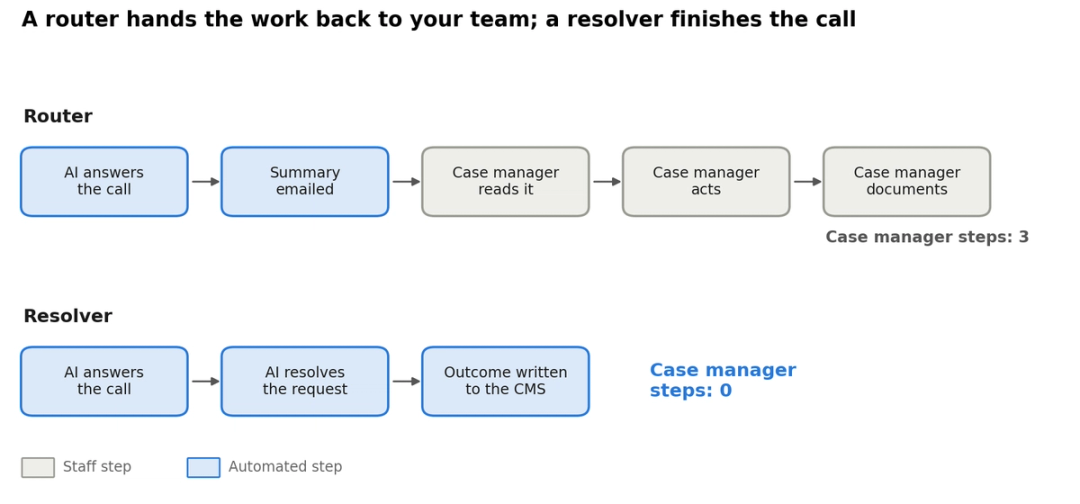
| Call type | Router | Resolver |
|---|---|---|
| Provider asks for a case status | Takes a message for the case manager | Pulls the status from the matter and answers |
| Lien holder asks for a balance update | Adds it to a callback queue | Confirms the details and logs the update |
| Adjuster returns a call at 4pm | Emails a summary to the team | Handles the routine request and notes the file |
| Client asks where their case stands | Promises a callback | Gives the approved update and records the call |
For a PI firm where each case manager carries around 100 cases, routing reduces missed calls without reducing handled calls. The workload stays the same and arrives formatted differently, which is the documentation gap answering services leave behind.
Check PI Workflow Depth Beyond General Legal Experience
PI workflow depth means the system has handled live provider, adjuster, and lien calls for plaintiff firms, beyond intake scripts. A system built for immigration intake does not know lien balance verification, and one built for family law scheduling does not know medical provider coordination.
Ask which PI firms run live call volume on the system today, with active case data and documented results. A configurable platform and a platform proven in PI deployments can look identical in a demo, which is why generic AI receptionists struggle at PI firms.
By our analysis, a typical PI case generates around 150 calls, and only about 10 of them happen at intake. The rest come from clients, providers, adjusters, and lien holders, as we break down in how many calls a PI case generates.
A system that only handles intake is solving the smallest part of the problem. Test the post-intake call types first, since that is where case manager hours go.
The same test applies across the wider set of AI tools for PI lawyers, beyond voice agents.
Evaluate Inbound and Outbound Capability Together
A PI firm needs an AI voice agent that makes calls as well as answering them, because outbound work is just as routine. Records are late from a provider, a client has not confirmed a treatment appointment, a lien holder needs a follow-up.
Ask what triggers an outbound call, and whether a person has to start each one or the system runs them from case file conditions. Our case for automating outbound calls at a PI firm walks through which calls to hand over first.
Understand How Pricing Scales With Your Actual Volume
AI voice agent pricing usually follows one of three structures, per minute, per call, or flat rate, and each one behaves differently at
PI call volume. The only fair comparison models every vendor against the same monthly call count.
| Model | How it bills | Where it works | Where it hurts |
|---|---|---|---|
| Per minute | Every minute of every call | Low, steady volume | Busy months and long provider calls |
| Per call | A fee for each call handled | Short, simple calls | High-volume months and repeat callers |
| Flat rate with a cap | Fixed fee up to a minute limit | Predictable months | Overage once the cap is passed |
| Fixed to volume | Monthly fee scoped to expected volume | Growing caseloads | Needs an honest volume estimate up front |
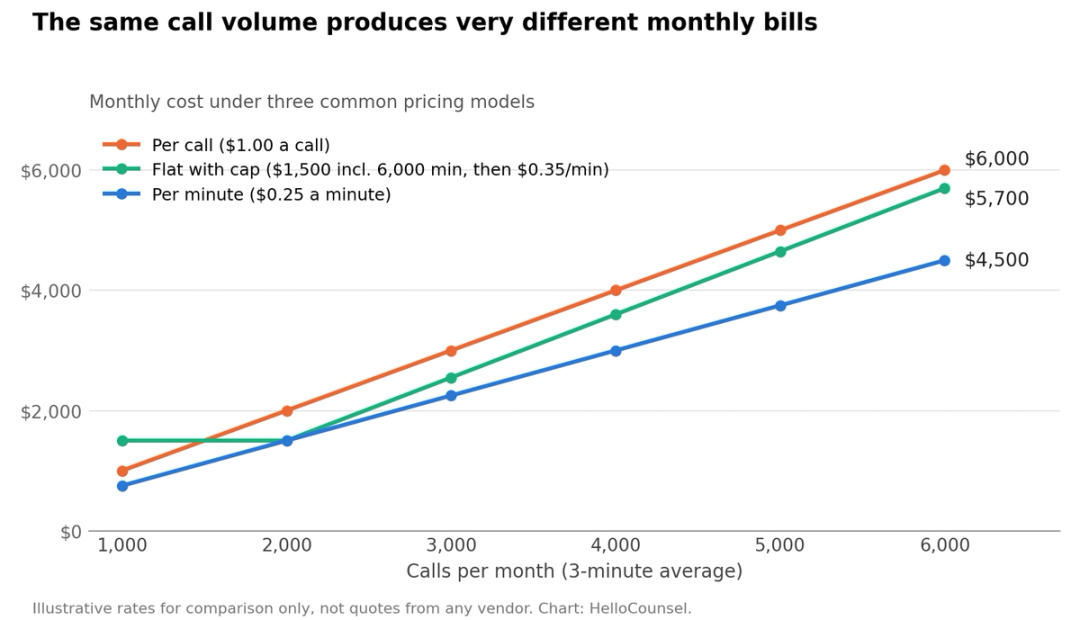
The chart uses illustrative rates, not vendor quotes. At 6,000 three-minute calls a month, $0.25 a minute comes to $4,500, $1.00 a call comes to $6,000, and a $1,500 plan with 6,000 included minutes reaches $5,700 once overage at $0.35 a minute kicks in.
Get a written estimate on your actual volume and average call length, and ask whether the price rises or falls as volume grows.
Our guide to AI receptionist pricing compares the models in more detail.
Price HelloCounsel on your real call volume
HelloCounsel quotes each firm on its own call and case volume, not seat count, and you pay only for tasks the agents complete. Share last month's call count for a written number. Get a volume-based quote
Verify Compliance and Confidentiality Claims Independently
Compliance claims only count when they arrive as written terms: a data agreement, a confidentiality commitment, and an outbound consent process. Three areas need separate answers.
HIPAA and the Business Associate Agreement
HIPAA applies directly to covered entities, which HHS defines as health care providers, health plans, and clearinghouses, and a plaintiff firm usually is not one of them. A firm becomes a business associate only in narrower cases, such as an attorney whose legal services to a health plan involve PHI.
Ask for a Business Associate Agreement or equivalent data protection terms anyway, since your AI vendor will hear medical details on nearly every provider call. If a vendor offers written data terms only on enterprise plans, treat that as a flag.
Confidentiality and model training
Your duty of confidentiality applies whether or not HIPAA does. ABA Formal Opinion 512 says lawyers using generative AI must protect client information under Model Rule 1.6 and supervise AI tools and vendors under Rules 5.1 and 5.3.
The opinion goes further for self-learning tools: the client's informed consent is required before information about the representation goes in, and boilerplate engagement-letter language is not enough. Ask whether the vendor trains its models on your call data, whether your data is isolated from other customers, and whether you can get an audit log, in writing, before any call goes live.
Note
Nearly half of consumers are not comfortable hiring a lawyer who uses AI to make decisions about their case, according to the same Clio 2025 report. Clear disclosure of what the AI handles, and what stays with your team, protects client trust as much as your ethics position.
Outbound calls and the TCPA
Outbound AI calls sit under the Telephone Consumer Protection Act. In a February 2024 declaratory ruling, the FCC confirmed that AI-generated voices count as "artificial" voices under the TCPA, so those calls need the called party's prior express consent, and prior express written consent for telemarketing, unless an exemption applies.
In June 2025, McLaughlin Chiropractic Associates v. McKesson held that district courts in TCPA cases are not bound by the FCC's interpretation of the statute. Consent questions now get decided court by court, so ask whether the vendor's outbound workflow captures and records consent by design.
Worth Knowing
The TCPA sets statutory damages at $500 per violation, and a court can raise that to $1,500 for willful or knowing violations, under 47 U.S.C. § 227(b)(3). The $500 applies to each violation.
Demand Specific Escalation Logic
Good escalation logic hands the caller to a person with the full call context, so nobody repeats themselves and the case manager starts informed. How a system handles the calls it cannot resolve tells you more about its reliability than anything in the demo.
Ask the vendor to show what happens when the AI meets a medical emergency, a case record with no data, or a caller in distress. Then test the same scenarios yourself during the pilot.
Callers notice the difference. In Clio's 2024 secret-shopper study, 73% of shoppers were unlikely to recommend the firms they contacted, while those who spoke with someone by phone were the most likely to recommend the firm.
Ask What Operational Data You Can See Afterward
After a month, a good AI voice agent shows you where cases are stalling, as well as how many calls it answered. That visibility is what turns call handling into shorter case cycle time.
- Client follow-up: Which clients have not been called back this week?
- Provider friction: Which providers keep calling about unresolved items?
- Documentation speed: How long does it take from a provider's first call to a documented case file?
- Escalation patterns: Which call types still reach a person, and why?
Firms that can see these patterns fix bottlenecks before they cost weeks, which is the core of reducing case manager workload.
Run a Pilot on Your Live Calls Before You Sign
A pilot runs your firm's actual calls and case types in production, while a demo runs the vendor's best scenario on prepared data. The edge cases that cause problems in production rarely appear in a demo.
The most reliable way to evaluate an AI voice agent is on your own calls, so request at least two weeks on your live call flow. Test provider inbound calls, an insurer disputing coverage, and what the case file looks like after a provider call resolves.
| Pilot metric | How to measure it | What good looks like |
|---|---|---|
| Calls resolved without escalation | Share of routine calls closed with no staff action | Rising week over week |
| Manual documentation steps | Count every note or update your team still makes | Close to zero on routine calls |
| Write-back accuracy | Spot-check 20 calls against the case file | Right matter, right fields, every time |
| Time to case note | Minutes from call end to note in the CMS | Seconds to a few minutes |
| Escalation quality | Ask staff whether handoffs arrived with context | No caller repeats themselves |
Every action your team still takes during the pilot is an action they will still take after you sign. Track them all.
Check How Deep the CMS Integration Goes
"We integrate with Filevine" can mean native two-way write-back into the correct case fields, or a webhook that drops unformatted text into a notes field. Only the first one removes documentation work.
Ask the vendor to show the integration in a live case record: which project, which fields, whether the note is structured, and whether anyone has to act for it to appear. The value of resolution only shows up when the outcome lands automatically, which is why CMS write-back matters.
Native write-back also cuts documentation errors such as missing fields, wrong case IDs, and delayed notes. Pick a call type your firm gets daily and ask the vendor to walk through every field that updates after it resolves.
If your firm runs on Filevine, our shortlist of the best AI voice agents for Filevine users applies this test platform by platform.
Bring one call type to a live walkthrough
Pick a call your team handles daily. We'll run it through the agent and show you every field that updates in your CMS. Book a workflow walkthrough
How HelloCounsel Measures Up Against This Checklist
HelloCounsel is an AI voice agent built for plaintiff firms, and it works inside your existing CMS rather than replacing it. Here is how it answers each criterion above.
- CMS write-back: Direct integrations with SmartAdvocate, Filevine, Litify, Lead Docket, CASEpeer, MyCase, and Lawmatics write every call into the case file as a note your team can see, and new systems are added on request.
- Resolution and case management: Agents complete routine calls end to end, including insurance claim opening, hold-time handling, and task completion.
- Reception and qualification: Agents answer in under two rings, recognize callers against your case files before picking up, and qualify intake calls against the criteria you set. See how AI intake works.
- Case opening: Once the fee agreement lands, the agent opens the file, gets the claim number from the adjuster, and collects missing documents such as insurance cards and IDs. Read about automated case opening.
- Medical records retrieval and organizing: After intake qualification, agents submit and re-submit requests, work provider phone trees, follow up by phone, email, and fax, and log every update in your CMS. See the medical records agent.
- Lead follow-up and Client Check-ins: Outbound calls run lead follow-up, treatment check-ins, and legal and medical coordination from case conditions.
- Pricing: Custom, based on your firm's call and case volume rather than seats, with no per-minute billing. You pay only for the tasks agents complete.
- Escalation and languages: English and Spanish with mid-call switching, and a warm handoff to your team when a call needs a person.
- Onboarding: One 1-hour onboarding call with 17 multiple-choice questions, and most firms go live in under two weeks.
Across our deployments, HelloCounsel has handled 30,000+ calls and more than 500 hours of call time, with 93% SOP precision in every call and a 48% improvement in call reception rates. Every call is measured, so the pilot metrics above are visible from week one.
What Does a Good AI Voice Agent for a PI Firm Look Like?
A strong AI voice agent for a PI firm resolves routine calls end to end, writes the outcome into your case file automatically, and surfaces the cases that are stalling. Many platforms do one of these well, and few do all three.
When you evaluate an AI voice agent, use the scorecard on every demo, run a two-week pilot on live calls, and track two numbers: calls resolved without escalation and documentation steps your team still takes by hand. Those two numbers show what you are buying, and what you will still pay case managers to do after go-live.
To see how vendors compare on these criteria, start with our ranking of the top AI voice agents for PI firms.
If Meet Gabbi is on your shortlist, see how it compares with other Meet Gabbi alternatives.
See HelloCounsel on your actual workflow
Bring one call process your team handles today. We'll show you where the agent fits, what gets completed, and what still goes to a person. Book a demo
Frequently Asked Questions
These answers cover the practical questions that come up once a firm starts running vendor evaluations.
1. How long should an AI voice agent pilot be?
Two weeks is the minimum useful window. The first few days go to configuration, and by day 10 or 12 you see real behavior on calls outside the scripts, such as unusual provider requests.
2. Who at the firm should run the evaluation?
Pair the intake manager with a senior case manager, since they know which calls cost the most time. Add the firm administrator for pricing and a partner for the confidentiality and consent terms.
3. Can an AI voice agent handle a PI firm's call volume?
Yes, if it is built for it. Cloud voice platforms handle concurrent calls in parallel, so raw volume is rarely the constraint; configuration depth on unusual provider, adjuster, and multi-party calls is.
4. How do I tell real PI experience from general legal experience?
Ask for a specific PI deployment: the call types handled and what measurably changed. A vendor with PI operations experience will describe provider and insurer calls, while an intake-only vendor steers back to intake.
5. Can we keep our answering service during the pilot?
Yes. Route one call type or after-hours traffic to the AI voice agent and keep your existing service on the rest, so you get a clean side-by-side comparison on the same weeks.
6. What is the difference between an AI voice agent and an AI receptionist?
An AI receptionist answers, screens, and routes calls. An AI voice agent can also do the work behind the call, such as phoning providers, updating the case file, and running outbound follow-ups, so it reduces staff tasks instead of passing them along.
7. What belongs in an AI voice agent contract?
A written price at your expected volume, data protection and confidentiality terms, a no-training commitment on your call data, consent handling for outbound calls, and a clear exit clause that lets you export recordings, transcripts, and notes if you switch vendors.
8. How do I measure results after go-live?
Take a baseline month before launch: missed calls, callback times, and staff hours spent on calls and notes. Compare the same figures after 30 and 90 days, and review which call types still end up with a person.
Share this article